
smevals - a small eval suite for evaluating models, prompts, and harnesses
We've been building a new system for running evals against different models, prompts, and harnesses, with the goal of being able to identify the most appropriate small and inexpensive models for different categories of task.
We've been building a new system for running evals against different models, prompts, and harnesses, with the goal of being able to identify the most appropriate small and inexpensive models for different categories of task.
Frontier models continue to improve at an impressive rate, but those improvements are often accompanied by increases in price as well. GPT-5.5 and 5.6 Sol are twice the price of GPT-5.4. Claude Fable 5 is twice the price of Claude Opus 4.8. Even Google's inexpensive Gemini 3.5 Flash-Lite model has increased in price from Gemini 3.1 Flash-Lite.
Meanwhile the options for inexpensive models have never been more abundant. Local models that run on small devices are exploding in capability, and the leading edge open weight models are improving at a dramatic rate, and at a price point significantly lower than their proprietary competitors.
The smevals vocabulary: evals, tasks, configs, runs, and grades
smevals (for small evals) is a Python CLI tool that executes eval suites that are defined as a directory containing YAML configuration and executable scripts. Here are the key concepts of the smevals system:
- An eval is a collection of challenges designed to answer a question about a model, for example, how good is that model at generating SVGs?
- Each eval is a collection of tasks. A task is a specific challenge, for example "Generate an SVG of a pelican riding a bicycle".
- When you run the eval you do so against one or more configs. Each config specifies a model to be evaluated, but may also include other parameters to test, such as different system prompts, model parameters, or agent harnesses.
- A run records what happened when a specific config was used to execute a specific task. A runner is the script that executes a run.
- Once you have collected one or more runs, you need to evaluate the results to see how well the model (or config) did. This is done by a grader, which produces a grade.
- Each grader runs a sequence of checks. These can be simple operations, like checking for a specific string in the output, or confirming that the output is valid XML. They can also be more complicated custom operations (implemented as scripts called checkers), including using other models to answer questions about the run.
The smevals process
To run an eval using smevals you need to:
- Design and implement the tasks for the eval
- Decide how you will be grading the outputs of that eval
- Run the tasks against one or more model configurations
- Run the grader to determine scores for those runs
The results of an eval can be examined either in the terminal or using a web application. The web reports can be baked out and published as static files.
Writing evals with a coding agent
The smevals README is designed for both humans and agents. A coding agent that reads that document should have everything it needs to know in order to construct an initial eval.
That README is also bundled with the tool, and is available using the smevals docs command.
This means you can start a session in Claude Code, or OpenAI Codex, or Pi, or your agent of choice, and prompt the following:
Run the command "uvx smevals docs"
Then, once the agent has read the resulting documentation:
Now build an eval that tests how well models can write haikus, with two tasks - a haiku about a pelican and a haiku about two otters in love
This should construct the eval in your current directory. You can then run it with this command:
uvx smevals run . -g
The . tells it to run the eval in the current directory. Adding -g causes it to grade the runs as soon as they have executed - without that you would need to run a separate smevals grade . command later on.
Here's the output I got from running this for the first time:
otters-in-love / default / gpt-4.1-mini ... ok (5.0s) -> runs/otters-in-love/default/gpt-4.1-mini/2026-07-24T01-07-45Z

    grade: pass score=1.0

pelican / default / gpt-4.1-mini ... ok (12.6s) -> runs/pelican/default/gpt-4.1-mini/2026-07-24T01-07-50Z

    grade: pass score=1.0
I ran it against two more models like this:
uvx smevals run . -g -m gpt-5.5 -m gpt-5.4-nano
That created four more runs, trying each of the two tasks against those two new models.
The runner used here is a short shell script called run-llm that calls the llm CLI with the model and prompt supplied by smevals, then saves the corresponding LLM JSON log as an artifact alongside the output:
#!/usr/bin/env bash

set -euo pipefail

llm -m "$SMEVALS_MODEL" "$SMEVALS_PROMPT"
llm logs -c --json > log.json
The initial eval is a small directory of seven files:
haiku/
├── eval.yaml
├── tasks/
│   ├── pelican.yaml
│   └── otters-in-love.yaml
├── configs/
│   └── default.yaml
├── graders/
│   └── default.yaml
├── checkers/
│   └── three-lines
└── run-llm
Improving the grader
The first version of the grader that Codex built for me only checked that the response contained exactly three non-empty lines. Here's that checkers/three-lines file:
#!/usr/bin/env python3
import json
import os
from pathlib import Path


output = Path(os.environ["SMEVALS_RUN_DIR"], "output.txt").read_text()
lines = [line for line in output.strip().splitlines() if line.strip()]
line_count = len(lines)
passed = line_count == 3

print(
    json.dumps(
        {
            "score": 1.0 if passed else 0.0,
            "metrics": {"line_count": line_count},
            "notes": f"{line_count} non-empty line(s); expected exactly 3",
        }
    )
)
raise SystemExit(0 if passed else 1)
Checker scripts run against the directory provided to them by the SMEVALS_RUN_DIR environment variable. They should output JSON with a score, optional metrics, and optional notes.
I told Codex:
Improve the grader to check for the right consonants and vowels using gpt-5.5
This caused it to add another checker - checkers/haiku-judge - which uses Python to execute llm prompts to evaluate the haikus. You can see the full script here. Here's the system prompt it used:
Evaluate the haiku below.
Count spoken syllables in each line using standard contemporary English pronunciation. Judge pronunciation, not the number of written vowel or consonant letters. A defensible common alternate pronunciation is acceptable. Also decide whether the poem clearly follows the subject requested by this task: {task_prompt}
Score poetic quality from 0.0 to 1.0 based on imagery, coherence, economy, and whether it feels like a haiku rather than three arbitrary fragments. Do not reward or punish the poem for punctuation or capitalization.
Haiku:<haiku>{haiku}</haiku>
The task_prompt was one of the two defined by the two tasks:
Write a haiku about two otters in love. Reply with only the haiku, exactly three lines.
Or:
Write a haiku about a pelican. Reply with only the haiku, exactly three lines.
The script also passes a schema describing and enforcing the shape of the JSON it wants to get back:
{
  "type": "object",
  "properties": {
    "line_syllables": {
      "type": "array",
      "items": {"type": "integer"},
      "minItems": 3,
      "maxItems": 3
    },
    "follows_575": {"type": "boolean"},
    "subject_present": {"type": "boolean"},
    "poetic_quality": {"type": "number", "minimum": 0, "maximum": 1},
    "notes": {"type": "string"}
  },
  "required": [
    "line_syllables",
    "follows_575",
    "subject_present",
    "poetic_quality",
    "notes"
  ],
  "additionalProperties": false
}
Now graders/default.yaml looks like this, with a new pass_threshold that is checked against the grade's score - taken from the last check to emit one, in this case haiku-judge:
name: default
checks:
  - checker: ../checkers/three-lines
    required: true
  - checker: ../checkers/haiku-judge
    model: gpt-5.5
    required: true
scoring:
  pass_threshold: 0.8
The new checker script ends with this:
raise SystemExit(0 if pattern_correct and subject_present else 1)
This means it only exits successfully if both the full 5-7-5 pattern and the subject are present. The overall outcome is a fail if any check fails.
smevals deliberately separates running the evals from grading them, which means that after you have updated a grader you can run it against the existing logged results like this:
uvx smevals grade . --regrade
Browsing the results
smevals includes a web application for browsing the results of the runs and grades. You can run that against a project like this:
uvx smevals serve .
This defaults to running on port 7001, or you can set a different port using the --port option, e.g. --port 8000.
The application lets you explore runs and grades, and see how the different models and configurations hold up against each other:
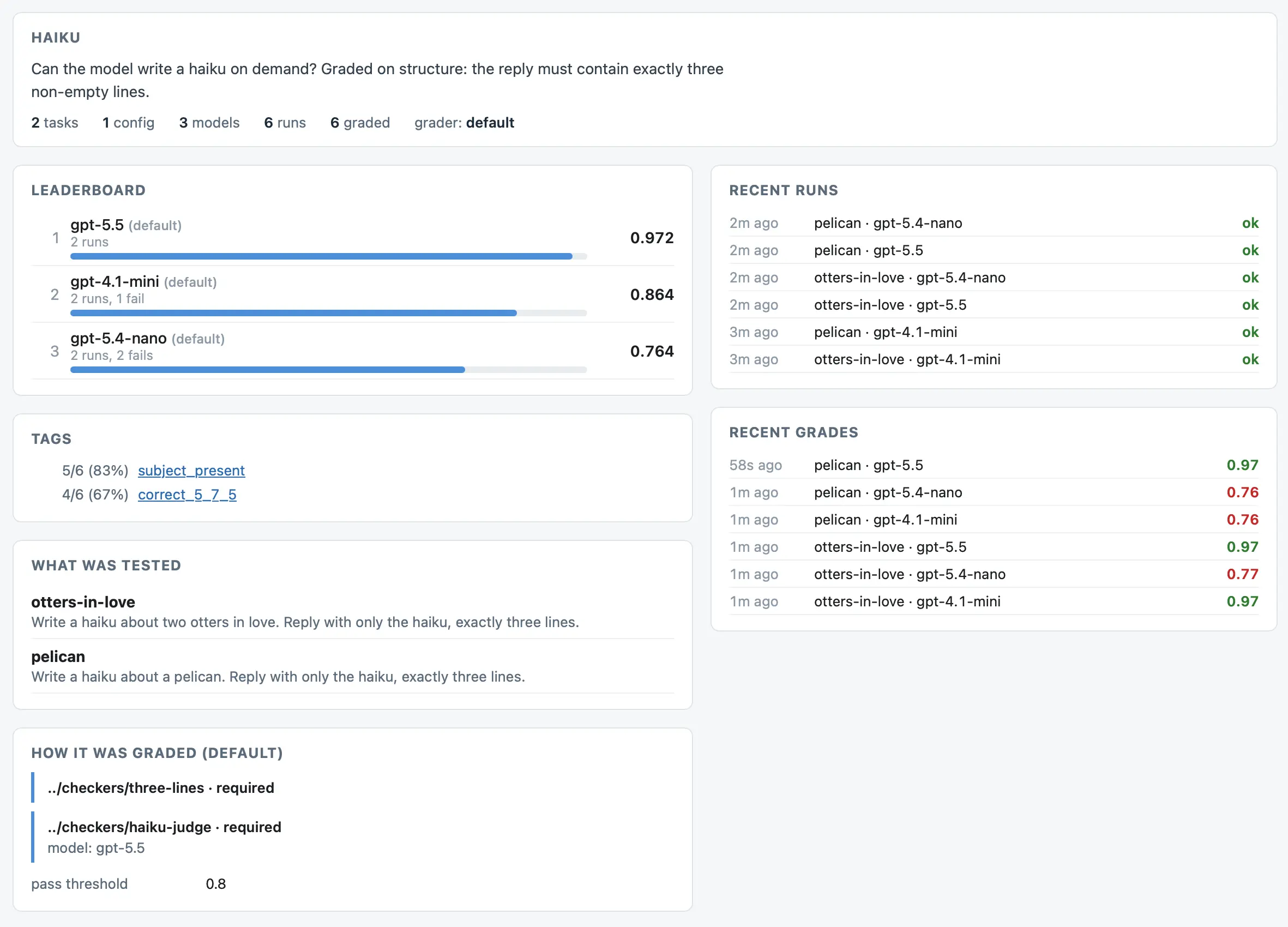
You can also build a static site version of the report using this command:
uvx smevals build .
This will create a build/ directory containing an index.html page and a copy of the files needed to render the report. Deploy that to static file hosting - or run uv run python -m http.server to start a local server - and you'll get a website that looks like this.