
External sandboxes for coding agents
We've been exploring safer ways to run coding agents, including against smaller, less capable models. Today we're releasing tools that let you run Claude Code, Codex or Pi in a way that ensures every command they run executes within a Linux sandbox that can only sees the folders and hosts you allow.
We call this pattern external sandboxes.
Our work consists of three prototype sandbox implementations - one using Node.js and WebAssembly, one using Apple Containers, and one using Microsoft's Quicksand with QEMU. All three implement the same protocols, and we're including instructions for having Claude Code, Codex, and Pi execute code in those sandboxes.
The simplest demonstration uses two npx commands.
Try it out with two commands
Change to your project directory and start a new sandbox using npx. This downloads Alpine Linux and runs it inside v86, an x86 emulator compiled to WebAssembly and hosted in Node.js. All you need is Node.js 22.19 or later:
npx --yes external-sandbox-v86 \
  --preserve-paths --mount-rw "project=$PWD"
Then, in a second terminal in the same directory, start a Pi coding agent like this. If you haven't used Pi before you'll need to run /login inside the agent to grant it access to a model.
npx --yes @earendil-works/pi-coding-agent \
  -e npm:external-sandbox-pi --no-builtin-tools \
  --sandbox-url http://127.0.0.1:8686
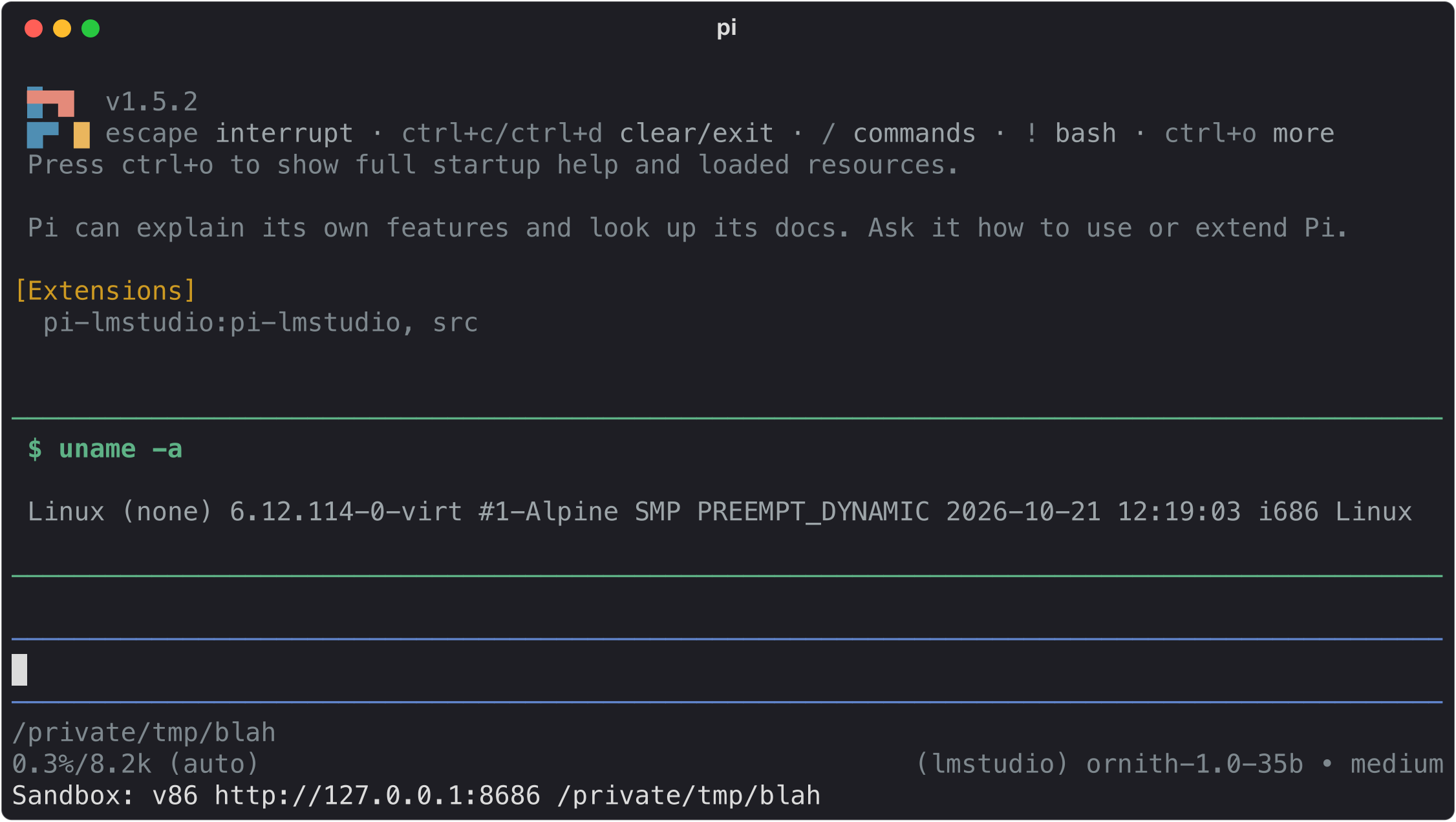
Run !uname -a in Pi and you'll see the following, showing that your commands are running in Alpine Linux:
Linux (none) 6.12.114-0-virt #1-Alpine SMP PREEMPT_DYNAMIC 2026-10-21 12:19:03 i686 Linux
The Pi coding agent can now execute commands and read and write files in the project folder, but will not be able to access anything else on your machine.
Claude Code and Codex both work too, with a little more setup. See below for details.
What this gets you
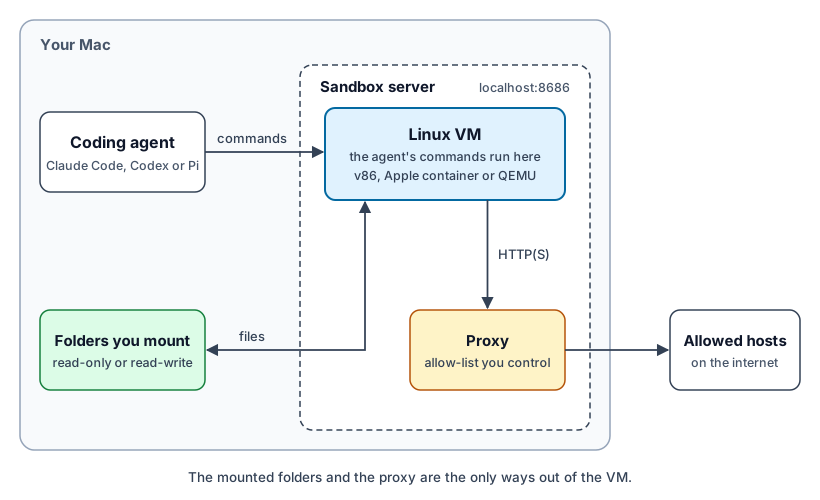
- Your agent stays on your Mac. Pi, Claude Code, and Codex all run on your Mac as usual. The commands they execute go to the sandbox.
- Your sandbox only sees the folders you mount. You control which folders are available to those commands, and if they are read-only or read-write.
- No network access unless you allow it. By default the sandbox cannot communicate with the outside world. Add the
--proxyoption when starting the sandbox to provide access via an HTTP/HTTPS proxy to only the hosts that you allow. - API keys that can't be seen by the agent. The proxy implements credential replacement, where requests to specific hosts have API keys added in a way that keeps those secrets outside of the sandbox and invisible to the calling agent.
- A web UI for modifying the rules. The web UI to the sandbox provides an in-browser terminal, tools for changing the proxy configuration and a log of requests that have been made over the network.
- Any agent works with any sandbox. The three sandboxes all implement the same protocol, so you can mix and match them with your preferred agents.
As a diagram
Why use external sandboxes?
Coding agents can get things wrong. When they make mistakes, anything that they have the ability to read or edit might end up damaged or compromised.
In an ideal world, our agents would run in secure environments where any damage they can cause is strictly limited. In the real world, many people give agents full access to both their computers and the wider world, then cross their fingers and hope for the best.
One solution to agent safety is to manually approve every action that the agent wants to take. This is a terrible way to work! It's frustratingly slow, and quickly leads to decision fatigue where we instinctively approve everything without taking time to fully understand the question.
The external sandbox pattern lets coding agents execute code and edit files inside a sandbox that gives the user control over the files, environment variables, and network connections the agents can work with - while still providing the flexibility of an agent that can run commands and write and execute code.
Anthropic and OpenAI have both invested a great deal of work into keeping their agents safe. Claude Code's auto mode and Codex's auto-review both use additional AI checks to decide when it's likely safe to continue, and these appear to work well.
Those checks are features of those particular products, though, and they still rely on a model judging each action correctly. A sandbox is a protection that doesn't depend on any model's judgment. If you're keen to explore alternative models, including less expensive models or models that can run locally, concerns about safety should be front and center. These lighter models are more prone to mistakes and are easier victims of deliberate prompt injection attacks.
Our goals are to find robust, trustworthy, easy to use ways to have coding agents do their work in a sandbox. The commands they run should only be able to read and write the files we choose, and only make the network requests we allow.
We explored two ways to have agents use a sandbox. The first is to run the agents inside the sandboxes - this is the approach used by systems such as Fly's Sprites. The second is to run the agent outside of the sandbox and have it send commands to a sandbox which exists separate from the agent.
We chose the second. This avoids weird behavior where the agent can modify itself or its direct environment, and keeps the sandbox boundary well defined and easier to audit.
We call this pattern "external sandboxes" because the sandbox is external to the agent, not to the computer: both sandbox and agent can run on the same machine.
The three prototypes
These are three separate but compatible projects that exercise three different strategies for external sandboxing.
- external-sandbox-v86 is a Node.js process that uses v86 in WebAssembly to run Alpine Linux. Its npm package bundles a full Linux distribution that runs in a sandbox!
- external-sandbox-container is a Python process that wraps Apple Containers running Linux. It can launch a container, run commands in it (sent via the protocol), then terminate it at shutdown.
- external-sandbox-quicksand is a Python process that runs a full QEMU virtual machine using Microsoft's Quicksand. QEMU and the Alpine image arrive as Python wheels, so there's nothing else to install.
The three systems offer identical localhost web APIs, but each agent connects to them in a different way:
- Claude Code sends only its Bash tool commands to the sandbox. Its native Read and Edit tools still run on the host, outside the sandbox.
- Codex sends its process and filesystem operations, including native
apply_patch. - Pi sends its
bash,read,write,edit,grep,findandlstools.grepandfindneed ripgrep in the guest, which all three default images include.
We've also produced a specification and conformance testing tool for that API, making it easy to build future, compatible sandbox servers on top of other technologies.
Using it with other sandboxes and agents
The v86 Alpine Node.js server runs on port 8686 by default. The Python Apple Containers server uses port 8687, and the Python Quicksand server uses port 8688, so all three can run side by side.
The v86 server is published to npm and runs with npx. The two Python servers are published to PyPI as external-sandbox-container and external-sandbox-quicksand, and run with uvx.
You can start the v86 Node.js server running like this:
# v86 Alpine Node.js (Node.js 22+)
npx --yes external-sandbox-v86 \
  --preserve-paths --mount-rw "project=$PWD"
For Apple Containers, run this:
# Python Apple Containers (Apple silicon Mac with Apple's container CLI)
container system start
uvx external-sandbox-container \
  --preserve-paths --mount-rw "project=$PWD"
For Quicksand, run this. The first run takes a little longer while it prepares and caches the Alpine image:
# Python Quicksand (Apple silicon Mac)
uvx external-sandbox-quicksand \
  --preserve-paths --mount-rw "project=$PWD"
Each server mounts the current directory read-write at /mnt/project and, thanks to --preserve-paths, at its original path too, so commands that mention host paths still work inside the sandbox. Add --mount-ro name=/some/path for read-only folders. Open the server's port in a browser to get the terminal and network rules UI.
Claude Code
Unlike the other agents, Claude Code's read and edit tools do not run via the sandbox. The mount rules limit what Claude's Bash commands can touch, but Claude can still read and edit files on your Mac directly.
To run Claude Code against a sandbox, grab the shared shell prefix script from the external-sandbox repo:
git clone https://github.com/prime-radiant-inc/external-sandbox.git
PREFIX_DIR="$(cd external-sandbox/claude-code && pwd)"
Then run this from the project directory the server was started in (this example uses v86 on port 8686):
mkdir -p .external-sandbox-claude-tmp
CLAUDE_CODE_SHELL=/bin/bash \
CLAUDE_CODE_TMPDIR="$PWD/.external-sandbox-claude-tmp" \
CLAUDE_CODE_SHELL_PREFIX="$PREFIX_DIR/claude-shell-prefix.sh" \
EXTERNAL_SANDBOX_API_URL=http://127.0.0.1:8686 \
claude
8686 is the port for the v86 server; use port 8687 for Apple Containers or 8688 for Quicksand. That .external-sandbox-claude-tmp directory needs to be inside the writable mount, because Claude Code uses it for its own bookkeeping.
Codex
To run Codex against them, create a dedicated Codex home with an environments.toml pointing at the sandbox (this example uses v86 on port 8686):
mkdir -p ~/.codex-external-sandbox
cat > ~/.codex-external-sandbox/environments.toml <<'EOF'
default = "external-sandbox"
include_local = false

[[environments]]
id = "external-sandbox"
url = "ws://127.0.0.1:8686/codex"
connect_timeout_sec = 5
initialize_timeout_sec = 10
EOF
Log in once with that home, then launch Codex using it:
CODEX_HOME=~/.codex-external-sandbox codex login
CODEX_HOME=~/.codex-external-sandbox codex --sandbox danger-full-access \
  -c features.shell_snapshot=false \
  -c features.unified_exec_tty=false \
  --cd "$PWD"
danger-full-access tells Codex not to layer its own sandbox inside ours. Our automated tests pass against Codex CLI 0.164.0, using codex exec and a simulated model. Its exec-server protocol is experimental, so other versions may need checking.
Pi
To run Pi against them, load our external-sandbox-pi extension with Pi's built-in tools disabled. Run this from the project directory the server was started in (this example uses Quicksand on port 8688):
pi -e npm:external-sandbox-pi --no-builtin-tools \
  --sandbox-url http://127.0.0.1:8688
-e npm: downloads the extension for that run only, and --no-builtin-tools means nothing can run on your own computer if the extension fails to load. The extension needs Pi 1.5 or later. Pi's status bar shows Sandbox: ... once it has connected.
Controlling network access
By default, the three sandbox implementations do not have any external network access. This provides protection by default against bugs or prompt injection attacks that could leak private data to an external source, as described in the lethal trifecta.
Each sandbox can be configured to allow HTTP and HTTPS network access via a proxy, with that proxy controlling which hosts can be accessed and the HTTP verbs that can be used with them. This can be used to allow read-only or full access to specific hosts.
When the proxy is enabled, HTTP_PROXY and HTTPS_PROXY environment variables are set in the sandbox so that clients like wget know how to access the network via the proxy. The sandbox also makes the proxy's CA certificate available, pointing variables such as SSL_CERT_FILE, REQUESTS_CA_BUNDLE and NODE_EXTRA_CA_CERTS at it, so that clients can access secure sites while allowing the proxy to inspect and filter their traffic. Code that ignores these settings and tries to connect directly is still blocked.
The --proxy-config option can be pointed at a file that specifies which hosts and which methods should be enabled for the session. Here's an example proxy configuration file:
{
  "allow": [
    {
      "origin": "https://pypi.org",
      "methods": ["GET", "HEAD"]
    },
    {
      "origin": "https://files.pythonhosted.org",
      "methods": ["GET"]
    },
    {
      "origin": "https://api.github.com",
      "methods": ["GET"],
      "credential": {
        "header": "authorization",
        "placeholder": "Bearer placeholder-github-token",
        "secretEnv": "GITHUB_TOKEN",
        "prefix": "Bearer "
      }
    }
  ],
  "guestEnv": {
    "GITHUB_TOKEN": "placeholder-github-token"
  }
}
Credential replacement for HTTP APIs
Credential replacement allows code running inside the sandbox to make authenticated calls to web APIs without the key itself being exposed to the agent or made available inside the sandbox.
The example above configures that for the GitHub API. Requests can be made via the proxy to https://api.github.com/ with an authorization header of Bearer placeholder-github-token. The proxy will replace these headers with the value from the GITHUB_TOKEN environment variable in the environment of the sandbox server running on the host. The guestEnv block gives code inside the sandbox a GITHUB_TOKEN variable holding the placeholder.
This means agents can make authenticated calls to APIs without the API key being made visible to the agent itself. An allowed host could still echo a credential back in its response, so only use credential rules with services you trust, and keep their methods and paths narrow.
Running the sandbox like this will make the GitHub API token available to the proxy:
GITHUB_TOKEN="$(gh auth token)" npx --yes external-sandbox-v86 \
  --proxy-config proxy.json \
  --preserve-paths --mount-rw "project=$PWD"
Monitoring the network and editing the policy
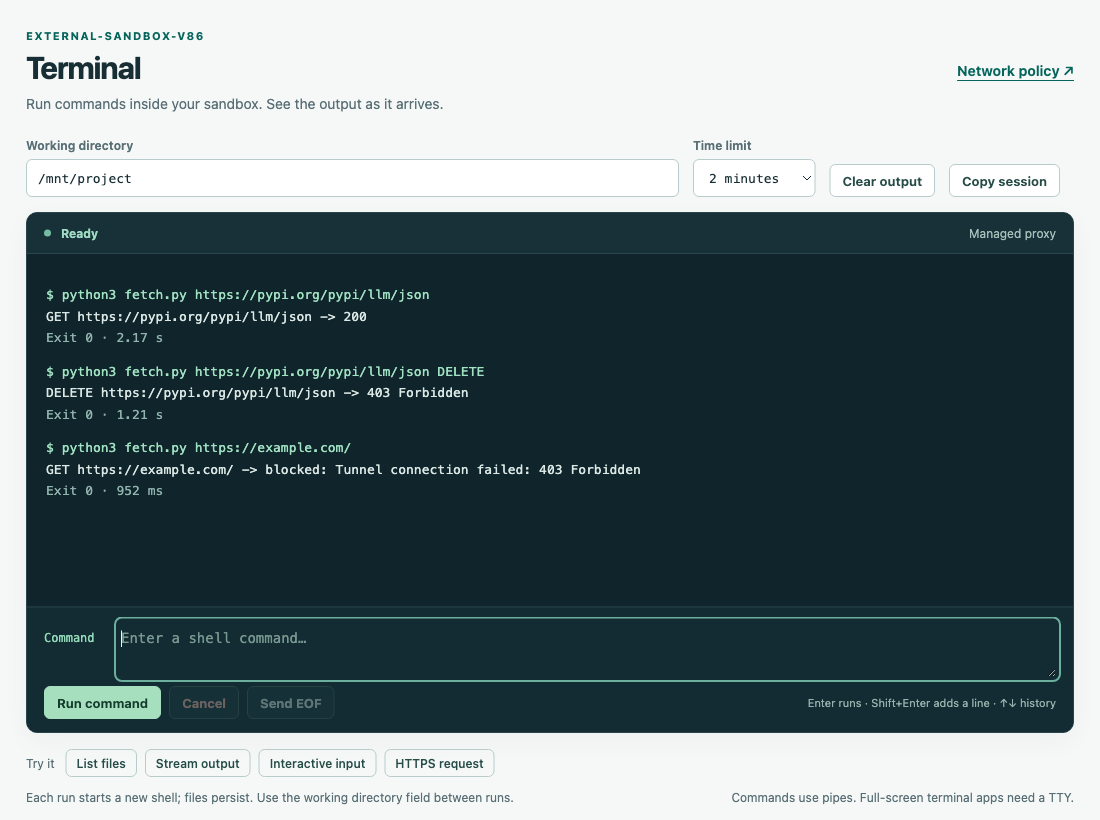
Here's a session in the sandbox web UI showing different requests being blocked or allowed based on the above example network configuration. fetch.py is a short script that makes one request and prints the result:
The /proxy page of the sandbox web UI allows the network policy to be edited while the session is running, and also shows a log of recent requests allowed or denied by the proxy:
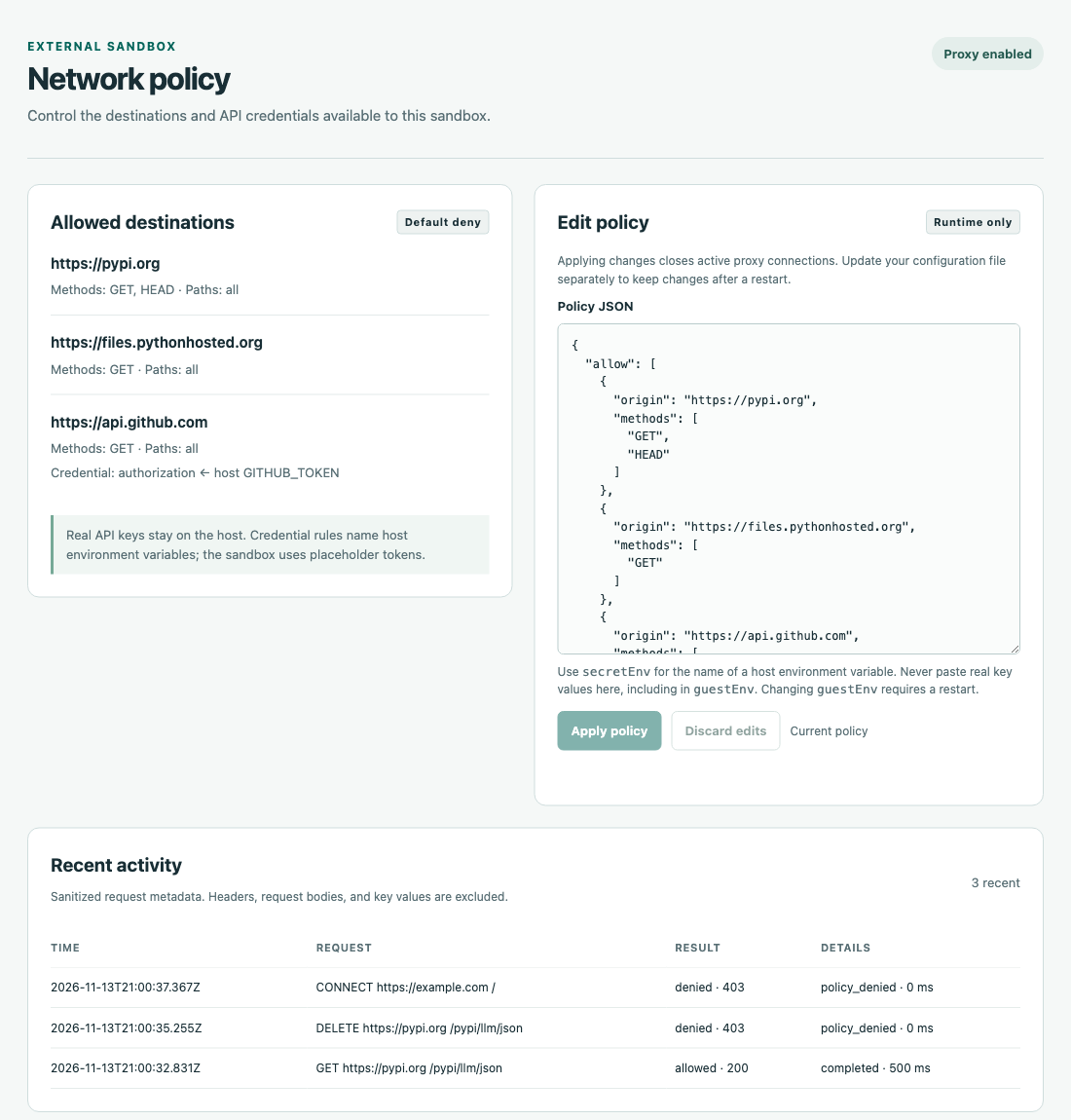
The /proxy page is only available if the server was started with either the --proxy flag or by passing an initial configuration using --proxy-config proxy.json.
Refer to the proxy section of the protocol specification for the full policy format, which all three sandboxes share, and the v86 proxy guide for more examples.
How each agent connects to a sandbox
Different coding agents provide different ways of ensuring all executed commands run in a custom environment.
CLAUDE_CODE_SHELL_PREFIX
Claude Code's mechanism for this is controlled by an environment variable. When CLAUDE_CODE_SHELL_PREFIX is set, Claude's Bash tool runs every command with that as a prefix, something like this:
claude-shell-prefix.sh 'uname -m; pwd; printf "hello from Linux\n"'
We can use this to take the intended commands and execute them any way we like, provided the execution environment can handle full shell strings (including environment variables, semicolons, etc.)
codex exec-server
Codex has a codex exec-server mechanism, which allows Codex to talk to "a small JSON-RPC server for spawning and controlling subprocesses".
OpenAI provide their own implementation of this as part of Codex, but since Codex is open source it's possible to extract out the details and build a separate implementation of them.
This means we can point Codex at a server implementing that JSON-RPC spec and it can then control that other environment.
The environments.toml file shown in the Codex section above is what points Codex at that server. Its url is the sandbox's /codex WebSocket endpoint.
Pi extensions
The Pi coding agent allows extensions to replace Pi's default set of tools with custom versions. external-sandbox-pi replaces the bash, read, write, edit, grep, find, and ls tools with versions that act against the configured sandbox.
It also configures Pi's !command and !!command shortcuts to execute inside the sandbox. !command runs a command and adds its output to the conversation, while !!command runs it without sending the output to the model.
Running pi -e npm:external-sandbox-pi --no-builtin-tools ensures that Pi has no tools that run on your own computer, even if the extension fails to load. If the sandbox cannot be reached, the tools return an error rather than falling back to those defaults.
Run this command inside Pi to confirm that commands are being sent to your sandbox:
!uname -a
You should see Linux rather than Darwin. The rest of the output varies depending on which sandbox you are running.
You can configure Pi to always talk to the sandbox by installing the extension and setting an environment variable like this:
pi install npm:external-sandbox-pi
export EXTERNAL_SANDBOX_API_URL=http://127.0.0.1:8686
Put the export line in your shell profile to keep it across terminal sessions.
To remove the extension, run this:
pi remove npm:external-sandbox-pi
Let us know what you think
These sandboxes should still be considered experimental prototypes: they are an effective demonstration of the external sandbox pattern, but they have not been audited to a level that you should trust them with sensitive workloads.
Two more limitations to keep in mind: A read-write mount still lets the agent damage anything in that folder, so keep it under version control and use read-only mounts where you can. And the sandboxes run Linux, so dependencies built for macOS - a node_modules or .venv folder in your project, for example - may need to be reinstalled inside the sandbox.
The combination of three different sandbox implementations with three different client agents shows that the protocol can be used to mix and match models, agents, and sandboxing platforms. If you want to build a sandbox on top of another technology, the specification and conformance tool are the place to start.
If you try these out and have suggestions for improvements or find flaws in our design, please let us know with an issue on the external-sandbox repo.